
TraceOrg's PKD longitudinal plot turns repeated imaging studies into a visual summary of how kidney volume changes over time. Each dot is one study. The line shows the estimated trend. The colored background shows the Mayo Imaging Classification bands, so the study measurements can be viewed in context.
Start with an example
The example below uses a simulated TraceOrg account with 8 studies from 2012 to 2040. Four studies are before the Transition date, and four studies are after it. A small amount of scan-to-scan variation is included so the example looks more like real repeated measurements.
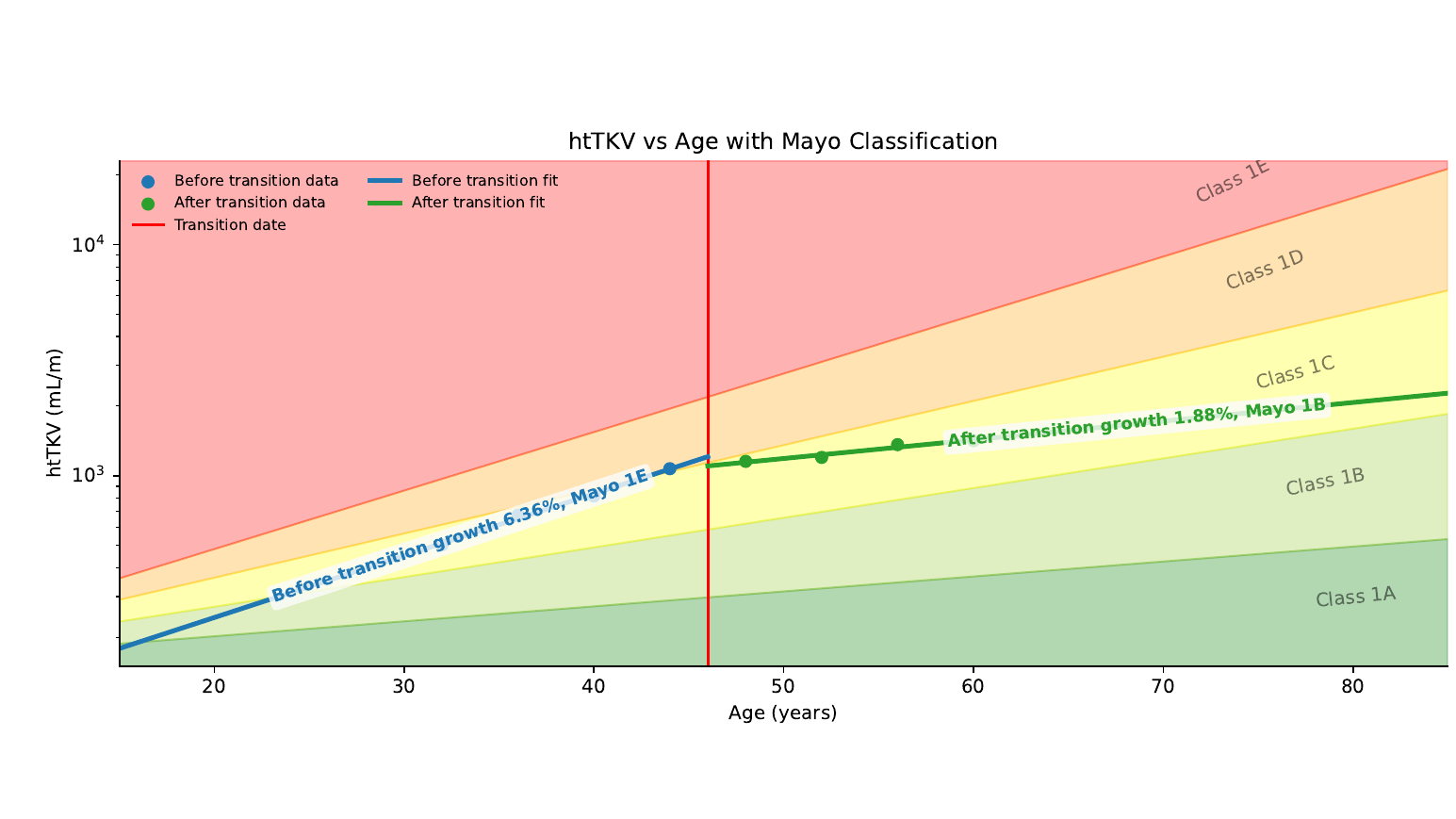
In the plot:
Blue dots are studies before the Transition date.
Green dots are studies after the Transition date.
The red vertical line marks the Transition date.
The blue and green lines summarize the before and after periods.
The background bands show Mayo classes 1A through 1E.
The Transition date is a neutral marker. It helps split a timeline into two periods, but the plot is descriptive only. It does not prove why a change happened.
How to create this plot in TraceOrg
Open or create a PKD subject.
Upload the imaging studies you want to compare.
Confirm each study has the correct study date.
Enter the required subject information: birth year and height.
Optionally enter a Transition date if you want TraceOrg to split the timeline into before and after periods.
Run the PKD workflow.
Open the generated longitudinal report.
The plot works best when there are several studies spread over time. More valid studies give the fit more information and usually make the trend easier to interpret.
What TraceOrg measures
TraceOrg estimates kidney volumes from the available segmentation outputs:
Total kidney volume, or TKV, is the sum of left and right kidney volume.
Height-adjusted TKV, or htTKV, is TKV divided by height in meters.
The report also lists left kidney, right kidney, and liver volume when available.
The table below the plot shows the values used for the figure, including the study date, age, htTKV, TKV, organ volumes, and period.
How the fitted line is calculated
TraceOrg models htTKV as exponential growth over age:
htTKV(age) = a * exp(b * age)This is fit by taking the natural log of htTKV:
log(htTKV) = log(a) + b * ageTraceOrg then uses least squares fitting on the log-transformed values. The annual growth rate is:
annual growth (%) = (exp(b) - 1) * 100When there are 4 or more valid htTKV studies, TraceOrg uses an observed-study two-parameter least squares fit. In that setting, both the starting level and the growth rate are learned from the observed measurements.
When there are 1 to 3 valid htTKV studies, TraceOrg uses a Mayo-anchored fallback for context. The fallback uses the Mayo Imaging Classification convention that htTKV at birth is 150 mL/m. This anchor is used for fitting context only. It is not shown as a fake study point and is not added to the volume table.
How the Transition split is handled
If a Transition date is entered, TraceOrg counts which studies are before and after that date. When both periods have enough valid measurements, TraceOrg draws separate before and after trend lines.
If one period has too few valid measurements, TraceOrg still shows the study dots and the Transition date, but it avoids forcing a strong period trend. The report note explains when a split is underpowered.
What to check before reading the trend
Study dates are correct.
Birth year and height are correct.
The included studies belong to the intended TraceOrg account.
The kidney segmentation QA looks reasonable.
The volume table matches the studies you expect to see.
The plot is a research imaging summary. It helps organize longitudinal measurements, but it should be read together with the source images, segmentation QA, and the rest of the report.
References
1. Hu Z, Sharbatdaran A, He X, et al. Scientific Reports 2024. Nature article
2. Irazabal MV, Rangel LJ, Bergstralh EJ, et al. JASN 2015. PubMed
3. Bae KT, Shi T, Tao C, et al. JASN 2020. PMC